
- Email yeldocollegesmd@gmail.com
- CALL +91 98461 10506 +91 98468 77776
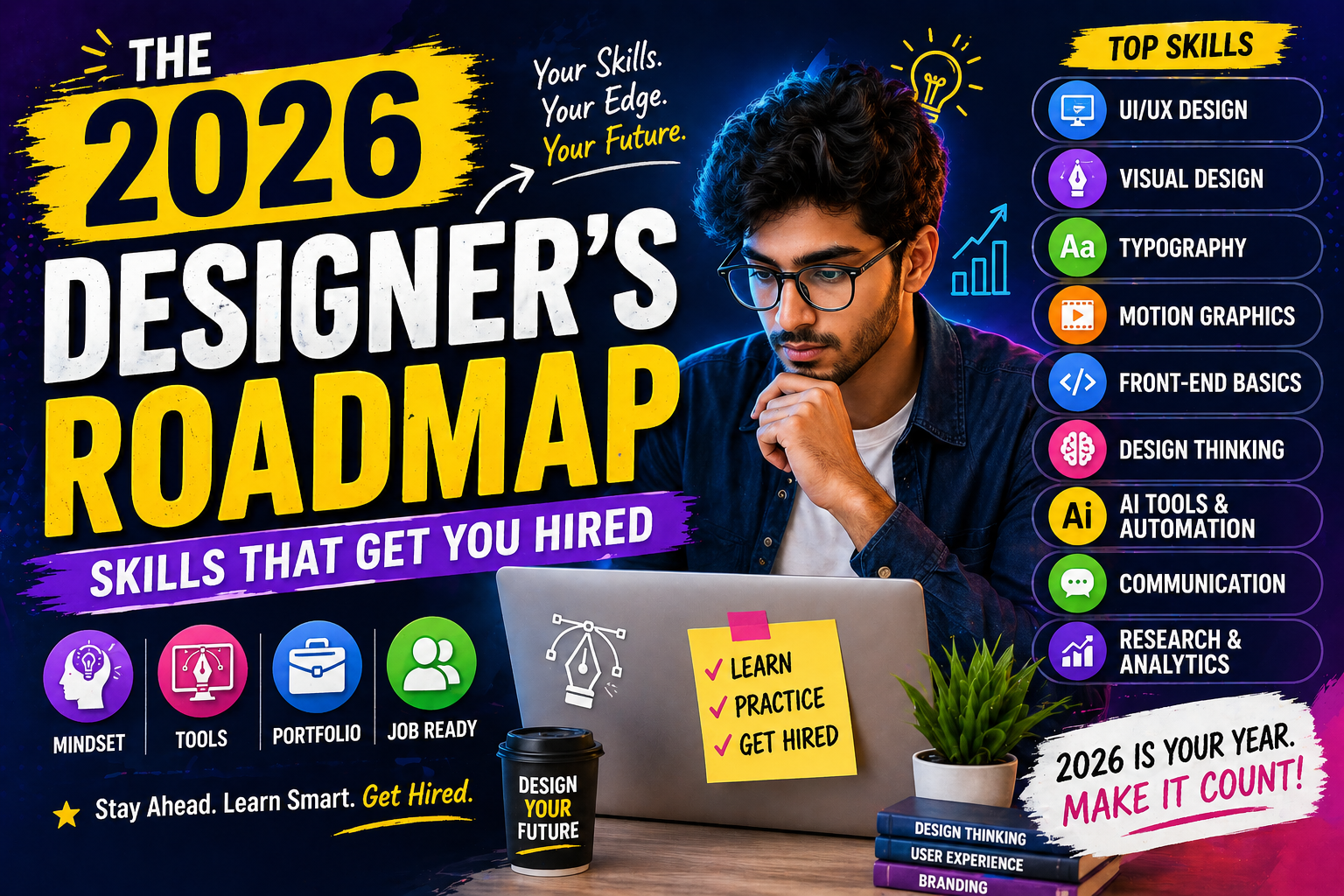
Design has outgrown the era of "making things look pretty." Today, it’s about solving problems, building trust and driving real results. Every design, whether it’s a poster, app screen or social media reel, needs to communicate clearly and guide decisions. It’s also not just about tools. How you think, communicate and approach problems matters as much as your design skills. That’s what sets strong designers apart. Employers now look for versatile designers who can handle branding, create digital content, understand UI and work with AI tools like Adobe Firefly and Midjourney. With the right guidance, this journey becomes clearer. At YMBC, students are trained to build creative and practical skills needed to become a designer with the best design courses in Kerala. And that’s what turns learning into a career that actually works in the real world.
The design space is more competitive than ever. You are no longer competing just locally, but with talent across the country. That is why continuous skill development is essential.
Companies now prefer T-shaped designers:
It goes beyond creating something visually appealing, but understanding why it works.
Here’s what’s behind this change:
In simple terms, design goes beyond execution. It’s about thinking, adapting and staying relevant.
Before tools, trends or AI, there is one thing that defines a strong designer: the basics. In our experience, students who get this right early don’t struggle later. Because no matter how advanced the software gets, fundamentals are what hold your work together.
Focus on:
A simple truth:
If your text is hard to read, your design has already failed.
Colour is not a visual filler. It’s communication. Good designers don’t guess colours, they choose them with intent.
Understand:
In branding, the right colour can build recognition faster than a logo.
This is where structure comes in. A well-designed layout feels effortless, but it’s always planned.
Key areas to focus on:
In real projects, clarity always wins.
A simple and well-structured layout will outperform a crowded, over-designed one.
Design doesn’t exist in isolation. It lives inside a brand.
Understanding branding helps you create work that is consistent and meaningful.
Learn:
As one of the design career skills, this is what separates a designer from someone who just makes graphics.
You are not just designing assets, you are building a brand experience.
Tools don’t define your creativity, but they shape how efficiently you work. The goal is not to learn everything at once, but to build confidence in the tools the industry actually uses.
Used widely for visual editing and digital content.
This is where precision and scalability come in.
Essential for structured and multi-page design work.
Now a standard for UI and collaborative workflows.
Useful for speed and everyday design needs.
Even if you don’t become a full-time UI designer, understanding user experience is a major advantage.
Good design is not just seen, it’s experienced.
We are in a motion-first content space.
Static visuals are still relevant, but motion adds impact.
You don’t need to master everything, but even basic motion skills can significantly increase your value.
AI is changing how designers work, but it’s not replacing creativity.
The key is simple:
Use AI to speed up execution, while you focus on ideas.
Design today lives on screens, especially social platforms.
Each platform behaves differently, and your design should adapt to that context.
Trends shape how your work is perceived, especially on fast-moving platforms.
Good editing builds trust. Poor editing breaks it instantly.
Custom visuals give brands a unique identity that stock images can’t match.
Even in a digital-first world, print design still plays a key role.
A small mistake in print can be costly, which is why attention to detail matters even more here.
This is where design starts creating real value, not just visuals.
Efficient designers know how to handle people, not just projects. As the skills needed to become a designer, this means presenting ideas with confidence, explaining decisions clearly and taking feedback professionally without ego. It also includes managing revisions smoothly and communicating well with clients, especially in freelance work. When you can explain your thinking clearly, clients trust you more and value your work.
Talent without discipline doesn’t scale.
In real studios, a clean file is as important as a clean design.
Your portfolio is your entry ticket into the industry. It’s not about showing everything you have done, but carefully selecting your best work. As one of the key design career skills, strong portfolios present projects as case studies, showing the thinking behind the design, not just the final result.
For students pursuing a graphic design course in Kerala, building a solid portfolio early gives a clear advantage when applying for internships and jobs. Including before-and-after comparisons helps demonstrate your problem-solving ability. It’s also important to optimise platforms like Behance and Dribbble, while building a personal website portfolio for a more professional presence.
A well-developed portfolio tells the complete story of your work, not just how it looks, but how it works.
The industry will keep evolving and designers who stay curious will stay ahead.
You don’t need to learn everything at once. But knowing where the industry is heading helps you prepare for what’s next.
To succeed today, a graphic designer needs more than creativity alone. It’s a mix of strong fundamentals, software skills, marketing awareness and the ability to work with AI tools like Adobe Firefly. These are the in-demand design skills for 2026.
The industry rewards those who stay curious and keep improving. Make learning a habit. To build skills needed to become a designer, practise daily, observe real-world designs and keep refining how you think, not just how you design.
Because in this field, the ones who grow consistently are the ones who stay ahead. And with the right guidance from YMBC, the best design college in Kerala, your journey becomes more structured, practical and career-focused.
1. What is the most important skill for a graphic designer?
Understanding design fundamentals like typography, colour and layout is the most important. Without these, tools won’t make a difference.
2. Should graphic designers learn AI tools?
Yes. AI tools are becoming part of everyday workflows. Learning them helps you work faster and stay relevant.
3. Is UI/UX important for graphic designers?
Yes. Even a basic understanding of UI/UX helps you design with the user in mind, making your work more effective.
4. Do graphic designers need coding skills?
Not necessarily. But having basic knowledge of how websites or apps work can be a strong advantage.
5. Can graphic designers work in UI/UX design?
Yes. Many graphic designers transition into UI/UX by learning user experience principles and digital product design
Tags: design skills 2026,skills for designers,in-demand design skills
September 22, 2026
September 22, 2026
September 22, 2026
September 22, 2026
September 21, 2026
September 21, 2026
September 21, 2026
September 21, 2026
September 07, 2026
September 07, 2026
August 29, 2026
August 29, 2026
August 28, 2026
August 28, 2026
August 28, 2026
August 28, 2026
July 27, 2026
July 27, 2026
July 27, 2026
July 27, 2026
July 25, 2026
July 25, 2026
July 25, 2026
July 25, 2026
June 27, 2026
June 27, 2026
June 27, 2026
June 27, 2026
June 27, 2026
June 26, 2026