
- Email yeldocollegesmd@gmail.com
- CALL +91 98461 10506 +91 98468 77776
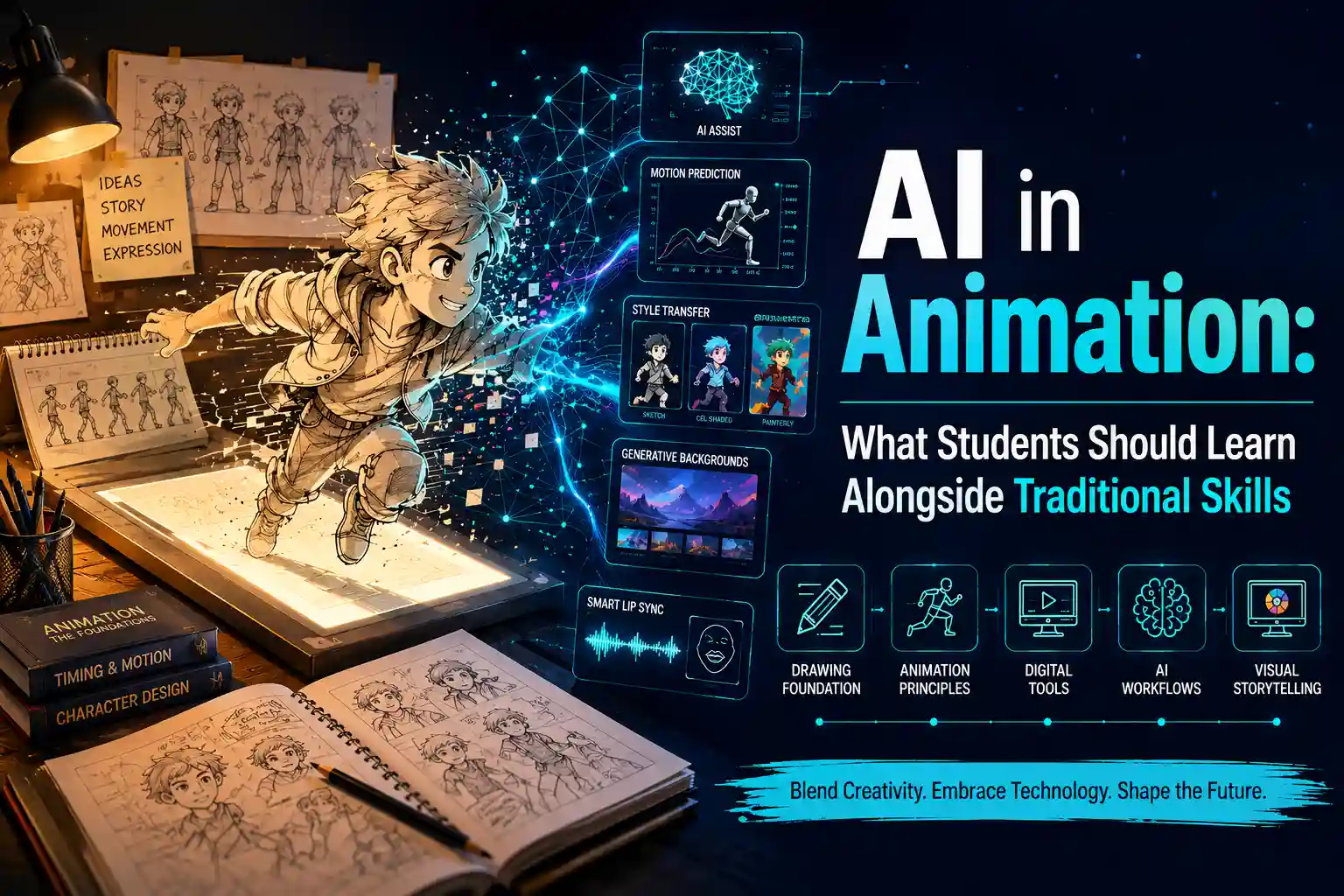
Animation AI in the creation of animation includes everything from initial concepts and storyboarding to motion and post production. As AI develops rapidly, many students are unsure what they should focus on learning: AI tools, traditional animation principles, or both.
The answer lies somewhere in between. AI in animation should be used to supplement rather than to substitute basic animation knowledge. One still needs to know about motion, timing, posing, character acting, story telling and visual communication. However, at the same time, it is necessary to see how AI technologies can help in animation processes.
The best way out is to become an animator who knows both the process of making creative decisions and the developing technologies. Instead of studying each new application of AI, one should learn how to recognise when it is useful for one's workflow
AI is no longer limited to generating images. It is gradually becoming part of several stages of the animation production pipeline. Understanding where it fits can help students use it more effectively.
AI can facilitate the early stages of the planning process for animation through assisting students with exploring ideas prior to the production stage. AI can be helpful in:
For instance, an animator can employ AI to develop various visual concepts for the scene before developing a final storyboard..
In visual design, AI could be useful in generating and comparing various creative ideas. The options available for exploration are:
It is important for the animator to choose and develop these ideas in accordance with the storyline..
AI can also help with certain production processes such as:
AI can help reduce time spent on repetitive tasks, allowing animators to focus more on creative and production decisions.
Some examples of how AI enabled tools can help include:
These examples show that AI can support different stages of an animation workflow rather than being limited to image generation alone
AI can create movement which will initially seem realistic, but students must understand how to animate to figure out if the movement really does work.
Some of the important aspects are:
Think about an AI created character walking across the room. The movement will seem technically realistic, but the animator must ask if the character has believable weight, proper feet positioning, proper body mechanics, proper timing, and personality. Traditional animation principles help students answer an important question: Does this movement simply look possible, or does it communicate something meaningful?
Animation is not just about movement. Animation is also about acting, emotion, character, and narrative.
Students need to learn how to do:
For example, two characters can do the same thing, but use their body positions, timing, and facial expressions to show totally different emotions.
The AI can suggest possible visuals, but the animator needs to choose what a character feels and why a character acts a certain way and why it helps the story.
Learning 2D animation remains valuable even for students who plan to work in 3D animation, VFX, motion graphics, games, or AI assisted workflows.
These concepts are imparted through traditional 2D animation training:
By practising frame-by-frame animation, students develop a stronger understanding of what makes movement feel believable, exaggerated, heavy, fast, or emotionally expressive.
Students exploring a 2D animation course in Kerala can therefore benefit from combining traditional animation practice with an understanding of emerging AI workflows.
The utilization of artificial intelligence for animations entails a lot more than providing a simple command like “animate this character.” The students have to explain the idea behind their creativity.
Some examples of good animations include:
One can ask the AI to animate the character in the following way: The character moves slowly through the rain covered streets and there is a side tracking camera with low lighting and a particular mood.
This does not mean prompt engineering is more important than animation. In fact, animation knowledge improves AI prompting because students understand what movement, camera direction, composition, and visual style they want.
One of the most important skills for students using AI is learning to critically evaluate the output.
Character Consistency
Check whether the character maintains the same:
Motion Consistency
Look for sudden changes in movement, unnatural transitions, or inconsistent body mechanics.
Scene Continuity
Check whether the background, lighting, objects, and environment remain consistent between shots.
Acting Quality
Ask whether the character's movement communicates the intended emotion and personality.
Physical Plausibility
Assess how the animation adheres to:
The animation produced by AI could appear impressive despite some inaccuracies. The professional animator should have the expertise to detect and correct them.
The terms AI assisted animation and AI generated animation describe different levels of AI involvement.
AI generated animations refer to AI making the major contributions to the production of visuals from the input received.
AI-assisted animation refers to a workflow in which an animator uses AI to support specific tasks while retaining greater human control over the creative and production process.
Some of them include:
An AI assisted animation may be useful for students, as the animator still retains the creativity of the animation process while employing the help of AI.
The use of AI doesn't mean that one should have no idea about the entire process of creating animations. Depending on their specialization, students will need knowledge about:
Students don't have to know all the applications on the market. They should pick software according to their career path and be aware of the connection between various steps of the production process.
For example, a 3D animator may focus on areas such as modelling, rigging, animation, lighting, and rendering, while a VFX student may specialise in compositing, tracking, simulations, or other visual-effects workflows.
Students can avoid confusion by following a structured learning sequence rather than trying to learn everything at once.
Stage 1: Animation Fundamentals
Begin with:
All these skills will serve as a basis for creating animations either manually or with AI support
Stage 2: Core Animation Software
Select a program according to your specialization, like:
Stage 3: Production Skills
Expand into:
These skills help students understand how individual animation tasks fit into a complete production.
Stage 4: AI Skills
Once the foundation is established, explore:
Stage 5: Critical Evaluation
Finally, learn to identify:
This sequence helps students learn AI strategically instead of simply chasing the newest tools.
AI skills should support your chosen specialisation rather than become a separate goal.
If You Are Interested in 2D Animation
Prioritise drawing, character animation, timing, storyboarding, and AI assisted concept development.
If You Are Interested in 3D Animation
Focus on modelling, rigging, animation, camera work, lighting, and AI assisted motion workflows.
If You Are Interested in VFX
Develop skills in compositing, rotoscoping, tracking, green screen workflows, and AI assisted cleanup or generation.
If You Are Interested in Motion Graphics
Prioritise typography, composition, motion design, editing, and AI assisted visual experimentation.
This approach makes AI for animators more practical because students learn technology according to the work they want to create.
Upon completion of their initial stage of education, they should have ideally achieved the following skills:
AI proficiency does not mean knowing many AI tools. It means the ability to know when to apply AI and how to do it..
Self learning of AI software is helpful at times, but there are chances that such learning might lack the creative element required to be a good animator.
The animation education system can integrate:
For students considering animation courses in Ernakulam, this broader approach can help connect software knowledge with creative thinking and practical production experience.
The goal is not simply to learn what a tool can do. It is to understand why, when, and how to use it effectively.
Students need to ensure that their portfolios do not consist only of images or short clips produced by an AI tool. A better portfolio would show both classic skills and the responsible use of a new technology.
Project 1: Classic 2D Animation
Make a short animated video which will show timing, motion, and character animation.
Project 2: AI Assisted Character Concept
Utilize AI at the stage of concept creation, further manually polish the character, and provide your explanations of creative choices.
Project 3: AI Assisted Storyboard
Utilize AI for exploring visual ideas but show your own skills in storyboarding.
Project 4: 3D or Visual Effects Project
Make a project showing technical skills of production and understanding of a classic workflow.
Project 5: AI Assisted Animation
Provide an explanation about:
Students are not required to go after each and every new application of AI. Rather, the right questions they can ask are:
Animation AI is becoming an important part of modern animation workflows, supporting ideation, previsualisation, repetitive production tasks, and selected post production processes. Nevertheless, such knowledge must not replace the conventional methods of animation, but rather be acquired along with them. The future animator must be technically adaptive as well as creative. While knowledge of AI animation programs might make one more adaptive, the knowledge of animation itself enables the student to apply such tools.For students exploring animation courses in Ernakulam, a structured learning path can help connect creative fundamentals with software skills and emerging technologies
For students exploring animation courses in Ernakulam, an academic environment such as Yeldo Mar Baselios College can help connect traditional animation principles with practical software skills and emerging animation technology.
Animation AI is any AI tool that helps or performs certain tasks related to animation production. Some of the processes for which AI animation can be used include concept creation, storyboarding, motion creation, lip sync, cleaning, compositing, and video production.
Yes, but students should learn AI animation tools alongside traditional animation fundamentals. Understanding timing, posing, movement, storytelling, and visual communication first allows students to use AI more effectively and critically evaluate the results it produces.
AI can automate or accelerate certain production tasks, but it does not remove the importance of creative judgement. Storytelling, character acting, timing, visual direction, problem solving, and creative decision making remain valuable skills for animators working with modern AI assisted workflows.
Yes. 2D animation develops essential skills in timing, spacing, posing, movement, expressions, and storytelling. These fundamentals help students understand what makes movement convincing and allow them to better evaluate and direct AI generated animation.
Students should learn core animation principles and production fundamentals first. Once they understand movement, storytelling, character acting, and visual communication, they can add AI as a complementary skill and develop an effective AI assisted animation workflow.
Tags: Animation AI AI in Animation AI Animation AI, Animation Tools, AI Assisted Animation, AI Generated Animation, Animation Skills, Animation Education, Traditional Animation, 2D Animation, 3D Animation, Animation Workflow
September 22, 2026
September 22, 2026
September 22, 2026
September 22, 2026
September 21, 2026
September 21, 2026
September 21, 2026
September 21, 2026
September 07, 2026
September 07, 2026
August 29, 2026
August 29, 2026
August 28, 2026
August 28, 2026
August 28, 2026
August 28, 2026
July 27, 2026
July 27, 2026
July 27, 2026
July 27, 2026
July 25, 2026
July 25, 2026
July 25, 2026
July 25, 2026
June 27, 2026
June 27, 2026
June 27, 2026
June 27, 2026
June 27, 2026
June 26, 2026