
- Email yeldocollegesmd@gmail.com
- CALL +91 98461 10506 +91 98468 77776
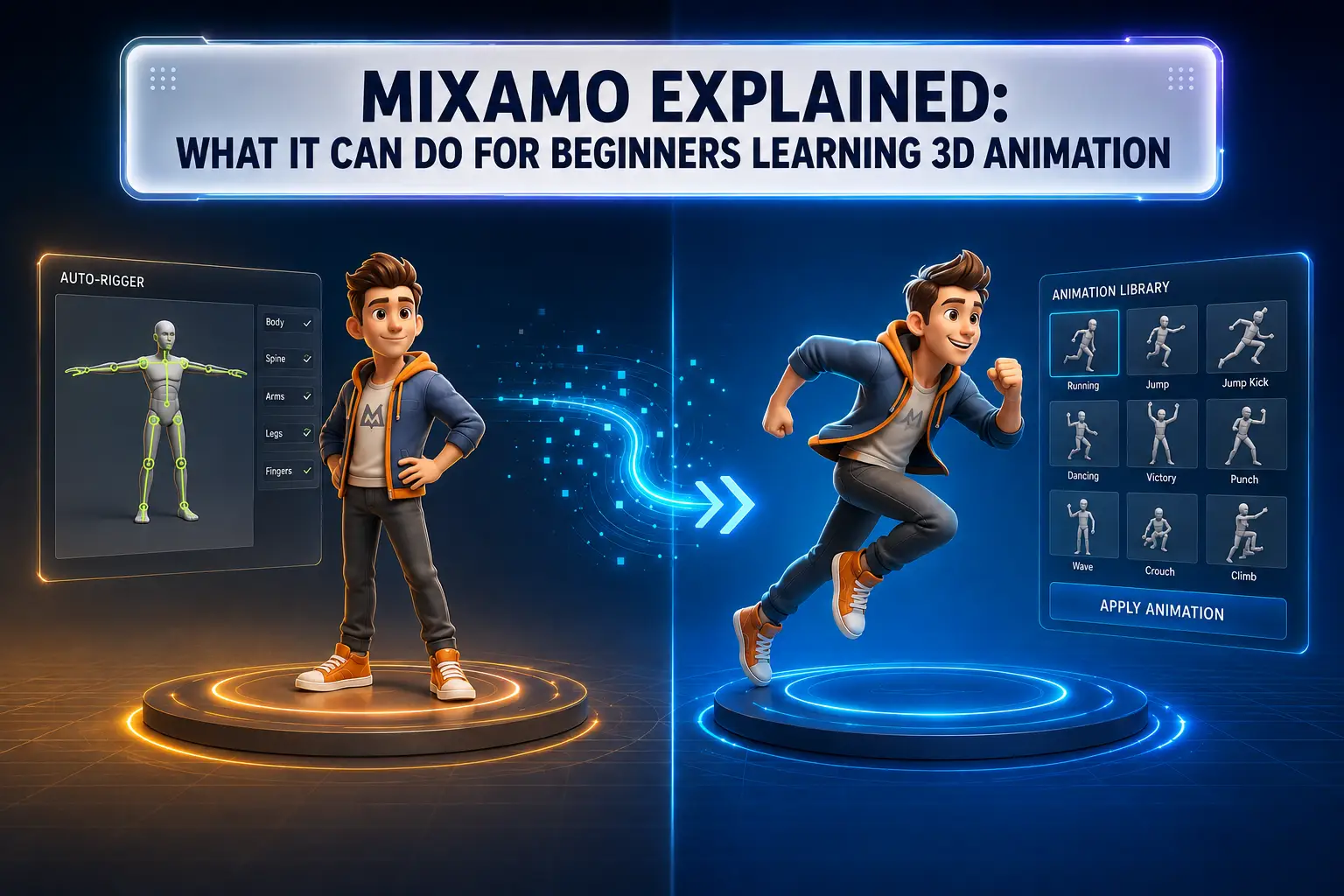
Learning 3D animation can feel overwhelming at first, especially when you are trying to understand modelling, rigging, movement and animation workflows at the same time. This is where Mixamo can make the early stages of learning more accessible. Mixamo is a web-based character animation service from Adobe that provides characters, animation assets and an auto-rigging workflow for compatible custom characters. Instead of creating every movement from scratch, beginners can explore ready made animation clips and see how characters move in a practical 3D workflow.
But does Mixamo actually help students learn animation, or does it simply make the process easier? The results depend on how effectively you use it.
Mixamo is designed to simplify parts of the character animation process. It provides a collection of 3D characters and ready made animation sequences that users can apply to compatible characters and download for use in other 3D workflows.
For beginners using Mixamo,the biggest advantage is that students do not have to build every element from the ground up before seeing a character move.
With Mixamo, beginners can:
This gives learners an opportunity to understand the relationship between a 3D character, character rig, and animation without becoming stuck at the most technical stage of the process.
Character rigging is one of the technical foundations of 3D animation. A traditional rigging workflow can involve creating a skeleton, placing bones and joints, setting up skinning, and adjusting weights so the character deforms correctly when it moves. For someone new to animation, these steps can feel difficult.
Mixamo auto rigging simplifies the initial setup for supported humanoid characters. A user can upload a compatible character and identify important body points, after which the system creates a rig that can be used with animations.
This means beginners do not initially need to:
However, Mixamo rigging does not make rigging an unnecessary professional skill. Understanding skeletons, deformation, weight painting, and custom controls becomes increasingly important as students move toward advanced character production.
The basic Mixamo animation workflow can be understood as:
3D model- Rig- Animation clip- Preview- Export- Edit
A character that initially stands still can be given movements such as walking, running, jumping, sitting, waving, fighting, or dancing. The Mixamo animation library is particularly useful for experimentation. Instead of spending hours creating a complete movement from the first keyframe, students can start with an existing animation and observe how the character behaves.
Ready made animation clips can help students:
This makes Mixamo a useful learning aid rather than simply a shortcut.
Using ready made assets does not automatically make someone an animator. However, Mixamo can help beginners experience the different stages of a 3D character animation workflow.
Students can begin to understand how different parts of a 3D animation workflow work together, including:
For example, a student could apply a walking animation, change its speed, compare it with another walk cycle, and place the character inside a simple environment. By watching the feet, arms, body and overall posture, the learner starts thinking about movement rather than simply clicking through software tools.
This is one of Mixamo's biggest strengths. Beginners can experiment quickly:
The important distinction is that using an existing animation is not the same as learning to create animation from scratch. Mixamo can introduce students to the pipeline, while animation fundamentals teach them how to create and improve movement.
Once students become comfortable with the basic workflow, Mixamo Blender projects can provide the next step. Blender gives learners greater control over the character and scene. Mixamo can provide the starting character and animation, while Blender can be used to import assets, view animation in the timeline, edit movement, combine clips, create environments, position cameras, and render the final scene.
The basic relationship can be understood simply:
Mixamo = a starting point for rigging and animation
Blender = greater control over the scene and animation workflow
Students can therefore use both tools as complementary parts of an animation workflow rather than treating them as competing solutions.
Mixamo is useful, but it has clear limitations. A beginner who relies only on ready made motion may miss important areas of animation education. Mixamo does not automatically teach:
A student can download a walking animation in minutes. A professional animator, however, needs to understand why the walk looks convincing. They need to recognise how weight shifts between the feet, how timing affects emotion, how poses communicate personality, and how movement supports a story. That is why animation principles remain essential even when modern tools make technical tasks easier.
Mixamo lowers the technical barrier for experimentation. It allows beginners to create early projects faster and makes the character animation pipeline less intimidating. But students pursuing professional animation careers need broader knowledge. Depending on their career path, they may need to study modelling, rigging, animation principles, lighting, rendering, compositing, storytelling, and production workflows. For students considering a 3D animation course in Kerala, learning tools such as Mixamo alongside core animation principles can provide useful hands-on experience. The goal should not be to depend on one tool but to understand how different tools contribute to the overall creative process.
A practical learning roadmap can look like this:
Stage 1 Understand 3D Basics
Stage 2 Understand Character Animation
Stage 3 Learn a 3D Software Workflow
Stage 4 Experiment With Mixamo
Stage 5 Create Original Work
This approach helps students move from experimentation to genuine creative skill.
Animation technology continues to evolve. Software becomes easier to use, automation handles more technical processes, and new tools continue to change the production pipeline. Yet the fundamentals remain valuable.
Students who understand movement, storytelling, visual communication, timing and character performance can adapt more easily when new tools appear. Instead of learning only where to click, they understand why a particular creative decision works. For anyone exploring a 3D animation college in Ernakulam, this distinction can be important. Learning software is useful, but developing a strong foundation allows students to use software creatively and adapt to changing industry workflows.
A small project can turn Mixamo into a practical learning exercise.
Try this workflow:
Through one small project, students can explore character workflow, animation timing, scene composition, camera placement, basic editing, and rendering. The goal is not to produce a perfect animation immediately. The goal is to understand what happens at each stage and identify what you need to learn next.
Mixamo is a powerful starting point for beginners who want to explore 3D character animation without becoming overwhelmed by the technical setup. Its auto rigging workflow, ready made animation clips, character assets, and quick experimentation make it one of the more accessible tools for entering a character animation workflow. However, Mixamo should support learning rather than replace it. A student who understands animation principles, posing, timing, spacing, body mechanics, rigging and storytelling will get far more value from the tool. The best approach is simple: use Mixamo to experiment, Blender to gain more control, and animation fundamentals to develop original work.
For students interested in building practical skills in animation and visual effects, structured education can provide a stronger foundation than learning individual software tools in isolation. Explore the programmes and creative learning opportunities at Yeldo Mar Baselios College to take the next step toward understanding the wider world of 3D animation.
Mixamo is used primarily for character rigging and animation. It provides 3D characters, ready made animation clips, and an auto rigging workflow for supported custom characters.
Yes. Mixamo is particularly useful for beginners who want to experiment with character rigging and ready made animation. However, it should complement rather than replace learning animation fundamentals.
Adobe's Mixamo service has historically been available without a separate Mixamo subscription, but availability and licensing terms can change. Always verify Adobe's current terms before publishing or using assets commercially. Adobe's official terms and service documentation should be treated as the final reference.
Yes. A common workflow is to download a Mixamo character or animation, typically as an FBX file, and import it into Blender. Once imported, users can view and edit the animation, add environments and cameras, and continue developing the project.
Tags: Mixamo, Mixamo animation, Mixamo auto rigging, Mixamo Blender, 3D animation, 3D character animation, character rigging, animation software, Blender animation, 3D animation for beginners, character animation
September 22, 2026
September 22, 2026
September 22, 2026
September 22, 2026
September 21, 2026
September 21, 2026

September 21, 2026
September 21, 2026
September 07, 2026
September 07, 2026
August 29, 2026
August 29, 2026
August 28, 2026
August 28, 2026
August 28, 2026
August 28, 2026
July 27, 2026
July 27, 2026
July 27, 2026
July 27, 2026

July 25, 2026

July 25, 2026

July 25, 2026
July 25, 2026
June 27, 2026

June 27, 2026
June 27, 2026

June 27, 2026
June 27, 2026
June 26, 2026